Showing posts with label OBIEE. Show all posts

Sunday, March 8, 2015

Consolidating on-premise and public cloud data on Oracle BI Apps


With an increase in the adoption of cloud applications by large corporations, most organizations today are in some form of hybrid state i.e. they are using a combination of both on-premise as well as cloud applications to run their business.

Regardless of where the applications maintain their data, organizations need the ability to see a complete view of the company spanning across different parts of the business, which in this case would be combining insightful data across on-premise as well as public cloud instances.

To take some examples:

1.     Combining HR and Financials data to analyze Revenue per employee
2.     Combining Sales and Financials data to create customer Scorecards
3.     Combining Sales and Order Management data to improve your demand planning system
4.     Combining your Sales and Financials Data for Forecasting

In this article, I would like to present multiple design approaches that other organizations have successfully used to consolidate data from multiple cloud and on-premise applications and to perform seamless analytics across these varied data sources.

If you are attending Collaborate15 (#C15LV), please join me to discuss this topic and case studies of what other organizations are doing to address this challenge. 

What is Cross Functional analysis?

Cross functional analysis is the ability to gather valuable business insights by efficiently joining both CRM and ERP data that are used to run front-office and back-office applications for an organization.


Shown in Figure 1 below is an example of cross functional analysis used to build a “Quarterly Revenue Forecast Report” for a Services Company that has three Business Units and Runs Oracle Cloud to manage its CRM and Oracle EBS to manage its Financial Processes.
Figure 1

Data Consolidation Options

There are multiple options you could consider to fulfill cross functional analysis by pulling information from a variety of source systems. Here, I would like to discuss the following two options:

1.     Consolidating all your insightful data on Oracle Business Analytics warehouse and using on-premise OBIEE to perform analysis
2.     Consolidating your data on Oracle Cloud Database schema and using Oracle BI Cloud Service (BICS) to perform analysis

The top half of Figure 2 below shows multiple cloud applications. The top lefts shows various cloud applications where data is generated and hosted. The top right shows the current Oracle cloud analytics platform that can be used to perform reporting.

Likewise, the bottom left shows multiple on-premise applications that create data on an on-premise instance. The bottom right shows OBI Application being used to perform reporting.

Figure 2


Option 1 - Consolidating all your insightful data on Oracle Business Analytics warehouse and using on-premise OBIEE to perform analysis

If you’re using all on-premise applications to run your business, you can use your existing Oracle BI Applications ETL process to extend into non-oracle data sources.

If you’re in a Hybrid state using some cloud applications to run certain parts of your business, you can use cloud ETL (Extract, Transform and Load) tools to move your data onto on-premise staging tables, followed by Oracle’s prebuilt adaptor to push the data onto corresponding Star Schemas.

You might want to choose option 1 to move your public cloud data (Salesforce, NetSuite, Oracle Applications cloud) on to Oracle Business Analytics warehouse (OBAW) if you have already deployed Oracle BI Application and are using its Data Model to consolidate to non-Oracle data sources.


Data Movement Technology

There are number of technologies you can use to move your public cloud data to an on-premise Data Warehouse staging table. Oracle has recently released a number of technologies and approaches that can be used for this purpose. The technology to move data between Cloud and On-prem instances is constantly evolving.

As shown in Figure 3 below, in order to consolidate the data into an on-premise Oracle Business Analytics Warehouse,  we would continue to use Oracle’s pre built adaptor to go on to oracle ERP sources, and use one of the newly released Data Movement technologies to move data from cloud to a common staging table. 
Figure 3

Design Considerations

1.     Use Staging tables to consolidate data from multiple applications(on-premise /public cloud)
2.     Leverage BI Apps Data Model
3.     Leverage Common dimensions for analysis across applications
4.     Assign Unique Data Source Number for each distinct applications


Option 2 - Consolidating your data on Oracle Cloud Database schema and using Oracle BI Cloud Service (BICS) to perform analysis

If you are considering cloud to build your enterprise analytics platform, there are number of Data Movement technologies that can be used to consolidate your data on Oracle’s cloud based database schema service.

The approach here would be similar to the one discussed in Option 1, the difference being, we will consolidate the data on Oracle Cloud based Data Base schema Service. 

Figure 4

Cloud technology is the next critical evolutionary step in software. It’s a trend that has momentum to become the dominant platform of the future. If you are interested in learning more about why you should consider cloud to build your enterprise analytics platform, you can view my earlier post here  on modernizing your analytics platform on Oracle BI Cloud Service.


Tuesday, November 18, 2014

How to modernize your business analytics platform with Cloud Solutions


In today's data digitized world, no business or organization can survive, let alone thrive without a solid data management and data analysis infrastructure. For several decades now, organizations have relied on platforms and analytics software to analyze their digital data in order to understand the health of their business, layout business and management strategies, identify growth opportunities and overall run their businesses effectively.

Over the years, it has been proven time and time again, the top performing companies who are constantly beating analysts’ expectations have also instituted leading analytic capabilities.  These companies have a solid data management infrastructure and a team that is constantly adapting to changes in the digital data management and data analysis landscape.  They are proactive in providing their business users with tools and capabilities which empowers users to analyze the data at a ferocious volume, integrate multiple sources easily and also in some cases giving them the freedom to perform self-service types of analysis.

Today, with Cloud Analytics solutions, it has become very easy for organizations and Lines of Business to get that level of analytical capabilities at a very low subscription based cost. So,  If  you are considering an upgrade of your existing Business Intelligence platform or still trying to consolidate and migrate your legacy reporting tool to an enterprise class data warehouse platform, you should consider cloud analytics solution like Oracle BI Cloud Service (BICS) to modernize your analytics platform.

BI’s Movement to the Cloud is happening at a staggering pace providing competitive advantage  

Gartner predicts worldwide software as a service (SaaS) application revenue will reach $22.1 billion by 2015.By the end of 2016, more than 50 percent of Global 1000 companies will have stored customer-sensitive data in the public cloud. The industry analyst firm also predicts that 30% of organizations have considered a cloud BI Deployment in the last five years and 50% of organizations will have considered a cloud BI deployment by 2015. This prediction simply states that if you’re not adopting cloud BI, your competition certainly is, and they are modernizing their analytics platform to better empower their Business Users while reducing data consolidation and data management cost.

What are the Business and IT challenges with the traditional, on premise based analytics deployment?

In my opinion, there are three major challenges with today’s on-premise based Business Analytics Deployments:

1.       Deployment approach – Every single BI Project starts with an expectation that business users know what they want during the start of the BI Project. Of course, some metrics that are key to understanding the health of the organizations are known and they don’t change as frequently. However, there are times business users need the ability to integrate new data feeds with their enterprise data. Users may want to integrate a new product data (data element) that was not considered during the requirements process but is key to understanding how their customers are reacting to the newly launched product/campaign. Being able to analyze the customer behavior on time (when it really matters) can mean a difference between retaining your customers and losing them to your competition.

2.       Turnaround time for enhancements –  In a typical BI environment, any new enhancement requests, even if it means the ability to analyze spreadsheet data with a fully working Enterprise Data Warehouse could mean a week(best case) to a couple weeks in most cases.  Again, this time frame is if you have a BI Competency center and an efficient change management process that your IT team follows.

3.       Infrastructure Planning - The infrastructure (hardware and software) capacity is usually planned to fulfill the BI need at the start of the project. Every time a new applications needs to be integrated, the hardware and software architecture changes. Again, this is not even including data types and applications that are not known today but will be of vital importance in the near future as newer applications are created and used by consumers to create new type of data files. 


How can cloud analytics platforms like Oracle BI Cloud Service (BICS) address the above Challenges?

1.       Easy Self-Service Capabilities- BI cloud services provides a complete self-service Business Intelligence for the business users.  Self-service really helps the business users in getting what they want quickly.  It gives them the capability to combine the single “source of truth” data that’s in their enterprise systems with any other external data that they want to combine. This means that users’ ability to make quick, timely decisions drastically improves.

2.       Outsource Infrastructure planning and ongoing maintenance to Oracle – Organizations can now offload ongoing infrastructure maintenance, backup, high availability as well as new functionalities that allows them to integrate new applications and data types into a Business Analytics platform by going with a vendor like Oracle and adopting Oracle BI Cloud Services (BICS).

Also keep in mind the cloud analytics offerings today has significantly matured as a product and is ready for prime time. All the previous hesitations to move to the cloud such as – security, reliability, data movement - have now been addressed by vendors like Oracle, particularly with their introduction of Oracle BI Cloud Service (BICS)

I sincerely believe that organizations which are considering building a modern analytics platform that can fulfill the changing digital landscape and empower business users to answer questions at a tremendous speed not just today but also in the future should definitely be looking at Oracle BI Cloud Service.

In my next post, I’ll talk about a migration strategy and path for customers considering Oracle BI Cloud Service as their Business Analytics platform of choice.
Monday, November 2, 2009

Understanding Oracle BI Application(OBIApps) methodology of deriving AGO Measures

Very often I have members from the IT team at Customer site asking me the question on how to customize OBIApps in order to derive Ago(Year,Quarter,Month,Day) Measures, which are not delivered Out of the Box(OOTB) .Of course there is a Time series function(AGO) in OBIEE which can be leveraged to fulfill these requirements , but in this article I would like to explain the OOTB approach that is taken to derive AGO measures. Getting familiar with OOTB approach and the underlying Data Model that is there to support similar requirements, can help us follow similar methodology for our customization.

In this article I have takenOracle BI Application 7.9.6>Human Resources>Workforce Profile Subject area as an example for understanding the Concepts.

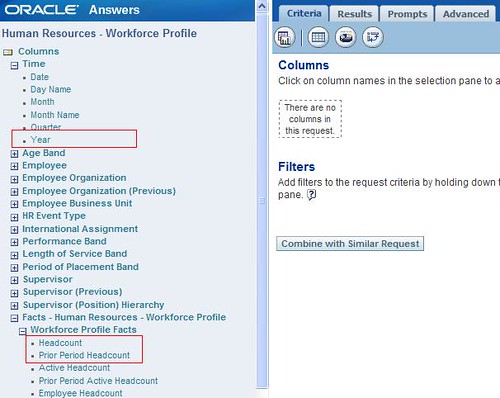
1.Below is the Screnshot of the OOTB Human Resources>Workforce Profile Subject Area .

2. Building a quick report with the Metrics above displays the results as below .

Note that Prior Period Headcount for 2006 is equivalent to Headcount value of 2005.

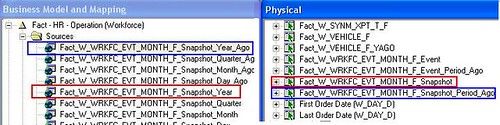
3. Let us now look into the design . Open the OOTB RPD and expand the Human Resource - Workforce Profile Presentation Catalog. Scroll Down and further expand the Presentation Table Workforce Profile Facts you should notice the two Presentation Columns Headcount and Prior Period Headcount .

4. These two Presentation columns are mapped to different Logical Table Sources as listed below
Fact_W_WRKFC_EVT_MONTH_F_Snapshot_Year
Fact_W_WRKFC_EVT_MONTH_F_Snapshot_Year_Ago
Fact_W_WRKFC_EVT_MONTH_F_Snapshot_Quarter
Fact_W_WRKFC_EVT_MONTH_F_Snapshot_Quarter_Ago
Fact_W_WRKFC_EVT_MONTH_F_Snapshot_Month
Fact_W_WRKFC_EVT_MONTH_F_Snapshot_Month_Ago
Fact_W_WRKFC_EVT_MONTH_F_Snapshot_Day
Fact_W_WRKFC_EVT_MONTH_F_Snapshot_Day_Ago


5.Further drilling down into the Physical Layer reveals that the above logial table sources are derived from the two Physical Table Aliases of the same table W_WRKFC_EVT_MONTH_F.

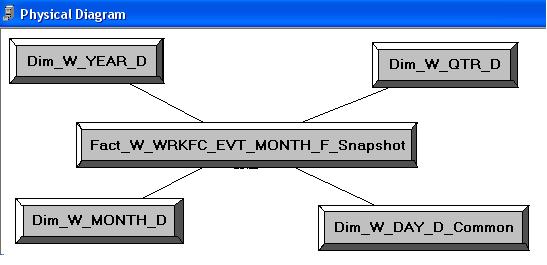
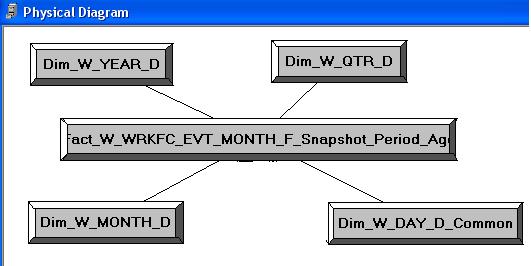
6.Below is the Physical Diagragm of the alias Fact_W_WRKFC_EVT_MONTH_F_Snapshot joinining with the Time Dimensions.

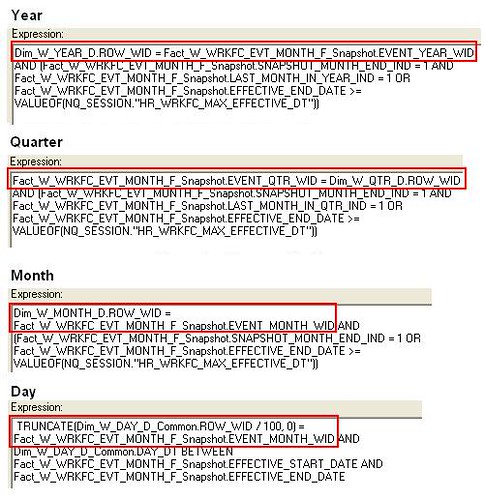
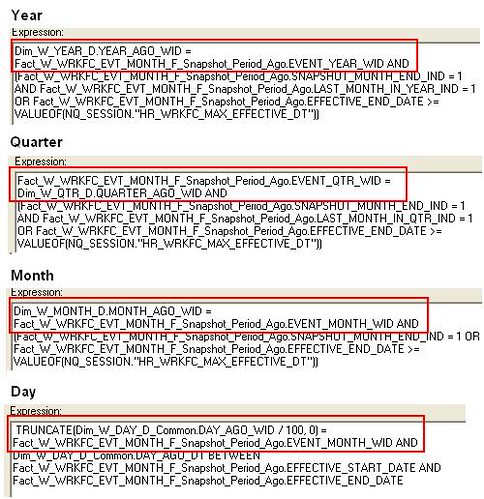
7.Below is the expression definition used in the join criteria . Note that ROW_WID of Year,Quarter,Month and Day Dimensions are used to join with the Fact table alias.

8.Below is the Physical diagram of the alias Fact_W_WRKFC_EVT_MONTH_F_Snapshot_Period_Ago joining with the Time Dimensions.

9.Below is the expression definition used in the join criteria . Note that YEAR_AGO_WID,QUARTER_AGO_WID,MONTH_AGO_WID and DAY_AGO_WID are used to join with the Time Dimensions.

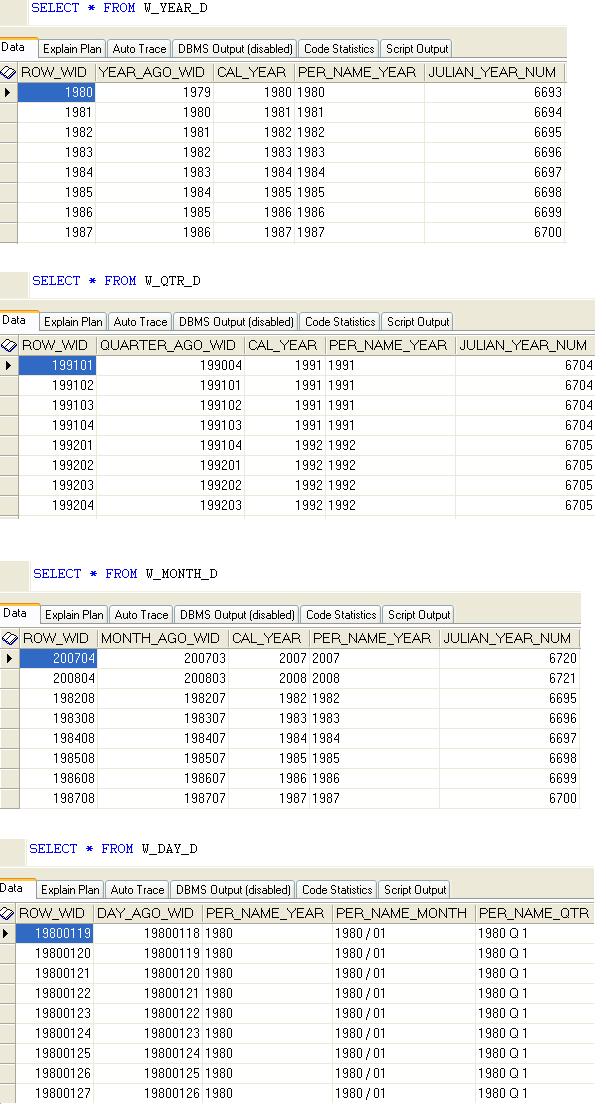
10.Let us now analyze the Data of the Time Dimension. As you can notice below the Data Model is in place which can be used to join and derive AGO measures.

11.Similar approach can be followed during Oracle BI Application(OBIApps) Customization for deriving ago measures which are not present Out of the Box(OOTB).

Configuring OBIEE Proxy(Act As) Functionality

As an OBIEE Developer we always want to be able to login as the Business Users in order to validate the security development. This can be done without the need to know the Business user's logon credentials by simply configuring the 'Act As' feature in OBIEE.
Below are the steps involved in enabling this feature.
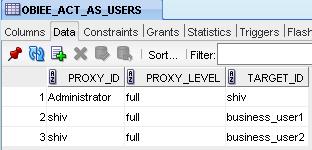
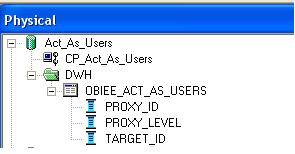
1.The Script below will create a Proxy table and insert three records so that the developer 'shiv' can login(proxy) as 'business_user1' and 'business_user2' and validate the security requirement is as expected.Also the 'Administrator' can proxy the user 'shiv'.


CREATE TABLE OBIEE_ACT_AS_USERS
(PROXY_ID VARCHAR2(50),
TARGET_ID VARCHAR2(50),
PROXY_LEVEL VARCHAR2(50));
INSERT INTO OBIEE_ACT_AS_USERS(PROXY_ID,TARGET_ID,PROXY_LEVEL) VALUES('Administrator','shiv','full');
INSERT INTO OBIEE_ACT_AS_USERS(PROXY_ID,TARGET_ID,PROXY_LEVEL) VALUES('shiv','business_user1','full');
INSERT INTO OBIEE_ACT_AS_USERS(PROXY_ID,TARGET_ID,PROXY_LEVEL) VALUES('shiv','business_user2','full');
COMMIT;


2.Import the table OBIEE_ACT_AS_USERS into the Physical Layer and Name the Database and Connection Pool as Act_As_Users , CP_Act_As_Users.

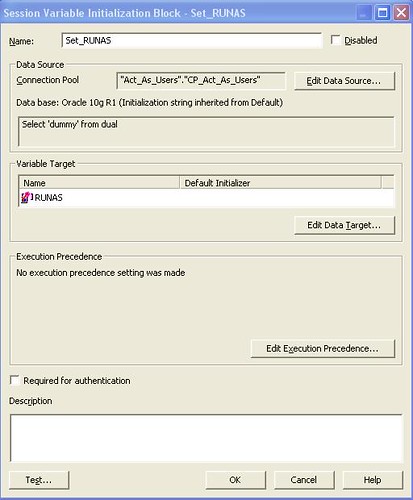
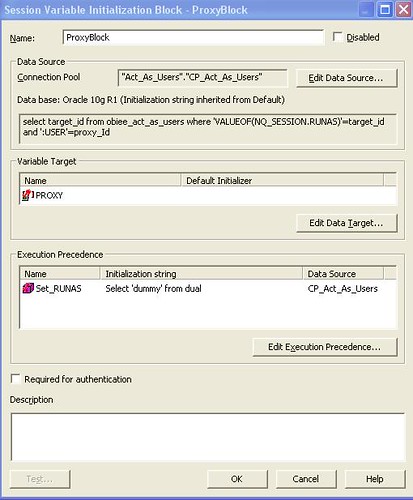
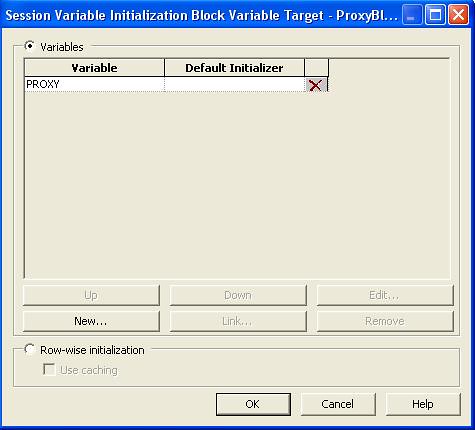
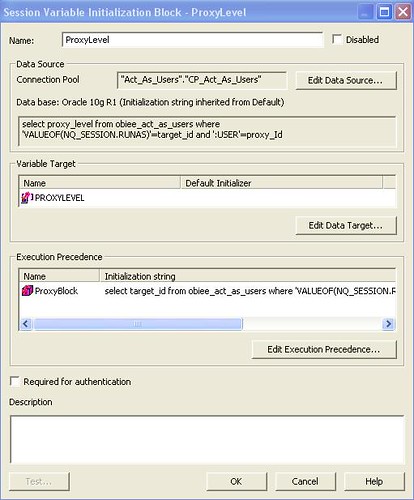
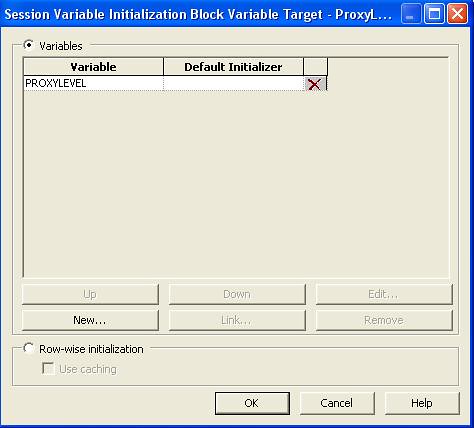
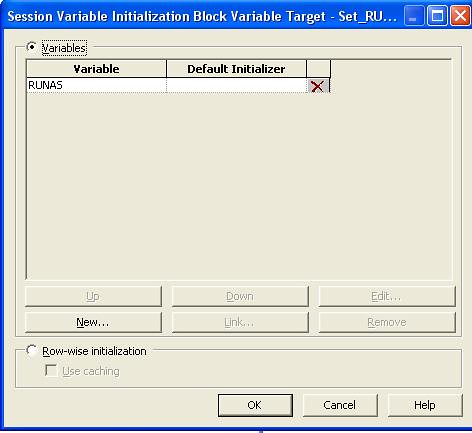
3. We now need to create three Session Initialization Blocks Set_RUNAS(Variable:RUNAS),ProxyLevel(Variable:PROXYLEVEL) and ProxyBlock(Variable:PROXY).

4.Initialization Block:Set_RUNAS
Default Initialization String:
Select 'dummy' from dual


5.Initialization Block:ProxyBlock
Default Initialization String:
Seleselect target_id from obiee_act_as_users where 'VALUEOF(NQ_SESSION.RUNAS)'=target_id and ':USER'=proxy_Id


6.Initialization Block:ProxyLevel
Default Initialization String:
select proxy_level from obiee_act_as_users where 'VALUEOF(NQ_SESSION.RUNAS)'=target_id and ':USER'=proxy_Id


7.Navigate to /OracleBIData/web/config/ and modify the file instanceconfig.xml to add the below tag before the </ServerInstance>

<LogonParam>
<TemplateMessageName>Act_As_Logon_Template</TemplateMessageName>
<MaxValues>100</MaxValues>
</LogonParam>


8.Navigate to /OracleBI/web/msgdb/customMessages/ and create a new XML file Act_As_Logon_Template.xml containing the below script.

<?xml version="1.0" encoding="utf-8" ?>
<WebMessageTables xmlns:sawm="com.siebel.analytics.web.messageSystem">
<WebMessageTable system="SecurityTemplates" table="Messages">
<WebMessage name="Act_As_Logon_Template">
<XML>
<logonParam name="RUNAS">
<getValues>EXECUTE PHYSICAL CONNECTION POOL Act_As_Users.CP_Act_As_Users select target_Id from OBIEE_ACT_AS_USERS where proxy_Id='@{USERID}'</getValues>
<verifyValue>EXECUTE PHYSICAL CONNECTION POOL Act_As_Users.CP_Act_As_Users select target_Id from OBIEE_ACT_AS_USERS where proxy_Id ='@{USERID}' and target_Id='@{VALUE}'</verifyValue>
<getDelegateUsers>EXECUTE PHYSICAL CONNECTION POOL
Act_As_Users.CP_Act_As_Users select proxy_Id, proxy_Level from OBIEE_ACT_AS_USERS where target_Id ='@{USERID}'</getDelegateUsers>
</logonParam>
</XML>
</WebMessage>
</WebMessageTable>
</WebMessageTables>


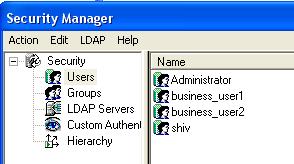
9. Within OBIEE Security add three new Users 'shiv','business_user1' and 'business_user2' as shown below.

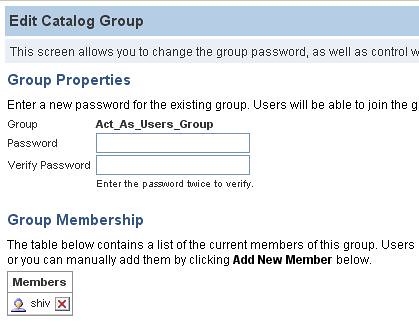
10.Create a new Web group Act_As_Users_Group and add the user 'shiv' to this group.

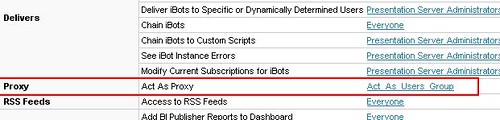
11.Cotinue to be logged on as an Administrator and Navigate to Settings>Administration>Manage Privileges and add 'Act_As_Users_Group to Proxy .

12. Restart the Oracle BI Server and Oracle BI Presentation Server.

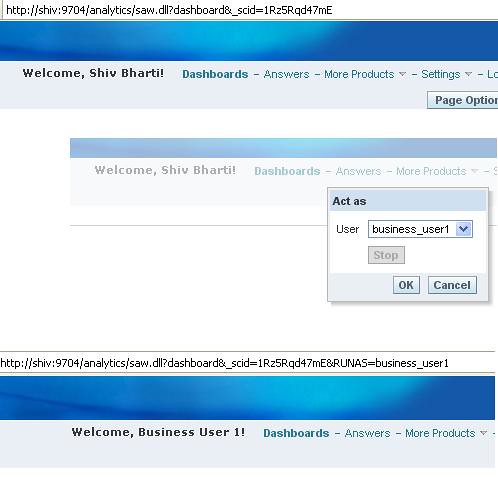
13. Login in as 'shiv' and then navigate to settings>Act as>business_user1

Friday, October 30, 2009

Ability to Enable/Disable DISTINCT and ORDER BY Clause in OBIEE at Report Level

There was a requirement from my customer to be able to Configure OBIEE at the report level such that the 'DISTINCT' and 'ORDER BY ' clause added by the OBIEE generated query on dimensional attributes can be gotten rid of when desired .

One of the Reason why we wanted to have this feature in our Dashboard was PERFORMANCE . Some of the queries were taking awfully long time to fetch data because of 'DISTINCT' and 'ORDER BY ' clause.

Let us first have a look at what I am trying to achieve and then I will explain the configuration steps.
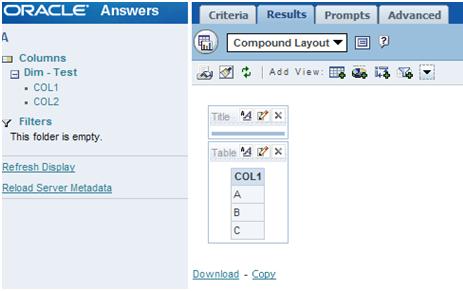
The screenshot below shows a simple adhoc request sent to OBIEE by selecting COL1

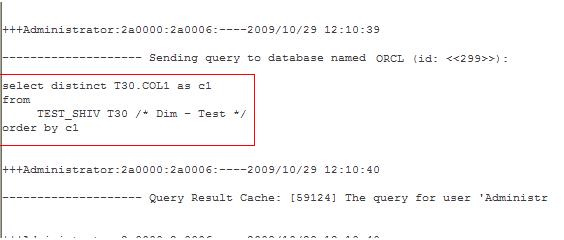
Analyzing the Query generated by OBIEE shows that DISTINCT and ORDER BY clause was added.

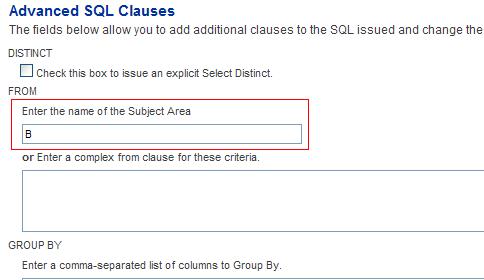
Now let us say if we would like to get rid of 'DISTINCT' and 'ORDER BY ' clause in this particular report query all that I am going to do is navigate to the Reports Advanced Tab and change the Value of the Subject Area from 'A' to 'B' as you can see below .

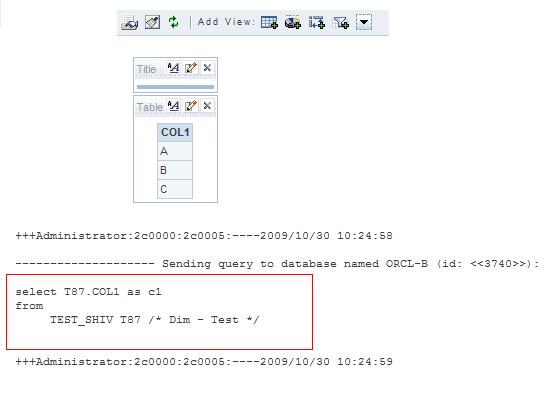
Let us re-run the same report and analyze the query . As you can notice below the 'DISTINCT' and 'ORDER BY ' clause has been removed for this particular query .

Let us now look into the steps to achieve this
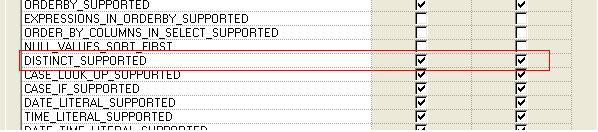
1.Within the OBIEE Physical Layer>Database Features by default the value of 'DISTINCT_SUPPORTED ' is checked .

2.Unchecking 'DISTINCT_SUPPORTED' feature will ensure that all the queries that uses the Connection Pool defined within this Database to remove 'DISTINCT' and 'ORDER_BY' clause . But the requirement is to be able to change for any selected report .
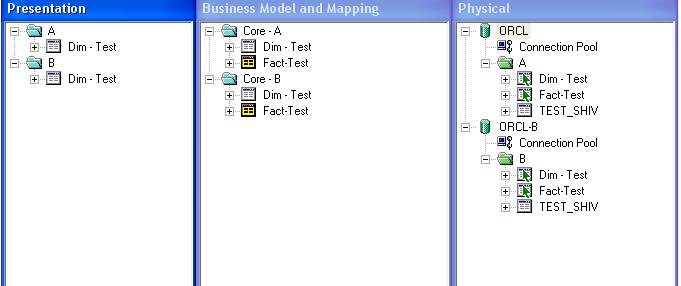
3.So I Copied all the three layers of the Metadata within the existing RPD as you can see below.The Only difference between the two are that 'DISTINCT_SUPPORTED' feature in one(B) has been turned off and they are named differently in all the three layers as you can see below.

4.To Summarize the steps . For the Subject area within which you want to be able to Enable/Disable the addition of 'DISTINCT' and 'ORDER BY ' clause .
i.Append all the three layers to the existing RPD with a different name.
ii.Uncheck the 'DISTINCT_SUPPORTED' feature for one of the Physical Datbase connection.
iii.Restart your Oracle BI Server .
iv.Go to the Reports Advanced Tab and Change the Subject Area name to point to 'A' or 'B' in order to Enable/Disable the 'DISTINCT_SUPPORTED' feature for the Report.

Saturday, October 17, 2009

Switching Report Data Source Name(DSN) or User Name from OBIEE Dashboards/Answers

One of My Customer had a requirement to come up with a design which would allow the OBIEE Admistrator to switch report Data source Name(DSN) from the Answers . Let us say currently a report is coming from a DSN = ORCL now if the Administrator would like to change the source to a new DSN = ORCL2 the administrator should be able to do so from the OBIEE Answers. To give you a brief background behind this requirement , When we went live all the realtime(near realtime to be precise) reports were pointed to a data source which was planned to be refreshed nightly .Therefore we wanted to be able to come up with a design where in we could easily point a report to the live production instance for selected reports if the Business users could justify the need for it to be realtime.

We will first see what I am trying to achieve and then explain you the steps .
The Below report is being sourced from a Data Source Name(DSN)= 'ORCL' .

Now if you would like to source the same report from a different Data Source let's Say 'ORCL2' we can do so by adding just one Prefix statment by going to the Reports>Advance tab.
SET VARIABLE OLAP_DSN = 'ORCL2'

After applying the above statment the Report now sources from a DSN=ORCL2 as you can see below .

Let us now look into the steps to achieve this
1. I created three Different Data Sources and ran the script to create two tables Department and Employees.You can download the script and the RPD from the link below.
Download
ORCL>DWH: Data Source(Database)=ORCL,Schema(User)=DWH
ORCL>DWH2:Data Source(Database)=ORCL,Schema(User)=DWH2
ORCL2>DWH:Data Source(Database)=ORCL2,Schema(User)=DWH


Make sure that you keep the Same Password for all the three different schemas above.
2. As you can see in the RPD I just imported the two Tables established the Join in the Physical Layer and Dragged/Dropped the Folder all the way to the Presentation Layer.Then I set the Aggregation as Sum For Employees>Salary.
3.We then need to create a Session Initialization Block as below with two variables.
SELECT 'ORCL' OLAP_DSN , 'DWH' OLAP_USER FROM DUAL

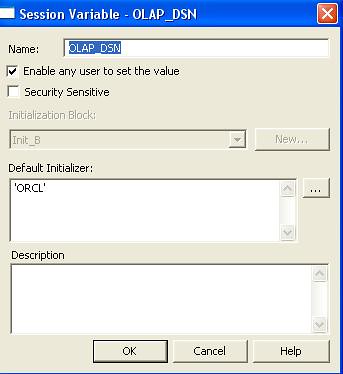
4.Variable OLAP_DSN . Make sure that 'Enable any user to set the value' is checked.

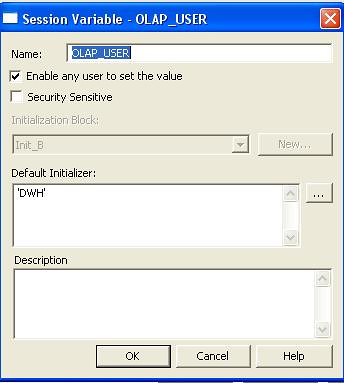
5.Variable OLAP_USER.

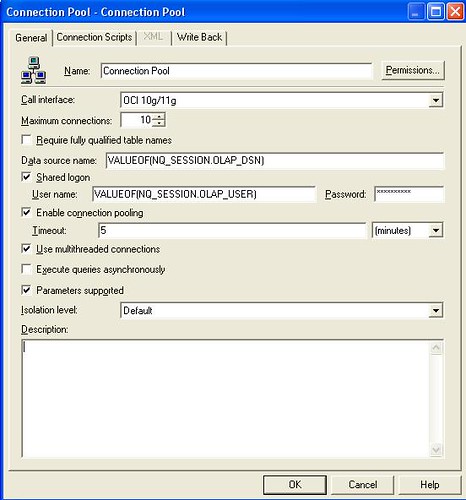
6.Now let us Modify the Connection Pool to use the Session Variables.
VALUEOF(NQ_SESSION.OLAP_DSN)
VALUEOF(NQ_SESSION.OLAP_USER)

7. Let us now create three Reports.
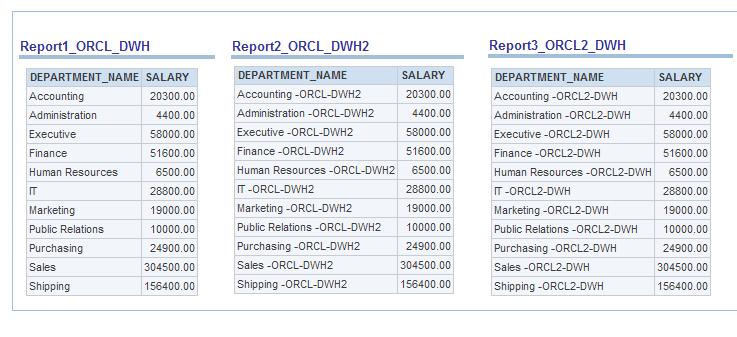
Report1_ORCL_DWH

Report2_ORCL_DWH2
Go to the Advanced Tab>Prefix and add the below script
SET VARIABLE OLAP_USER = 'DWH2';

Report3_ORCL2_DWH
Go to the Advanced Tab>Prefix and add the below script
SET VARIABLE OLAP_DSN = 'ORCL2';


7.As you can see below the reports are coming from three different Data Sources in a Single Dashboard Page.

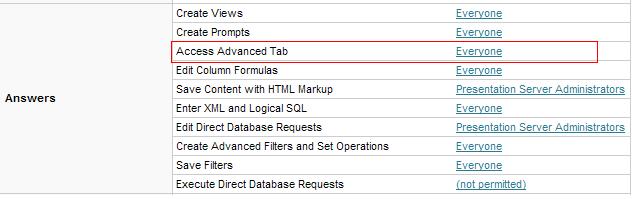
8. The Administrator can now Navigate to Administration>Manage Privileges>Answers:Access Advanced Tab and grant privileges to the group who is allowed to add the script in the Reports Advanced Tab.

Monday, October 12, 2009

How to host Multiple RPD and Multiple Presentation Services in OBIEE within the Same Windows Box

Article Summary: Host Multiple RPD/Presentation Services in OBIEE within the Same windows box i.e setup OBIEE Development/QA instance in the same machine .

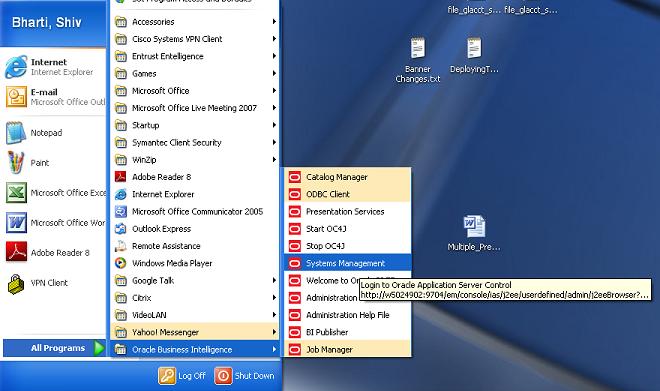
1.Navigate to Oracle Business Intelligence>System Management


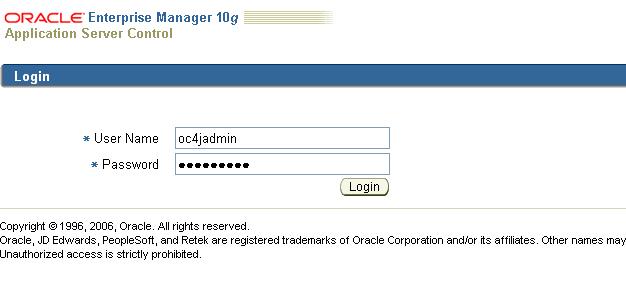
2. Give th 'oc4jadmin' password . This is the password that you give while installing OBIEE , In this case I gave the password as 'oc4jadmin'.


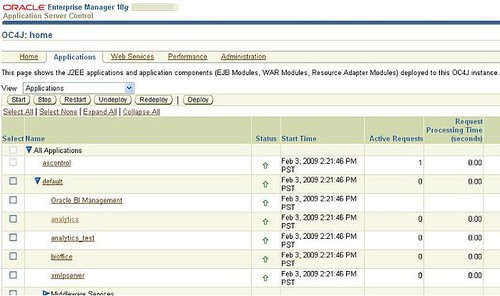
3. Once you are logged in Navigate to Applications Tab and Click on Deploy.


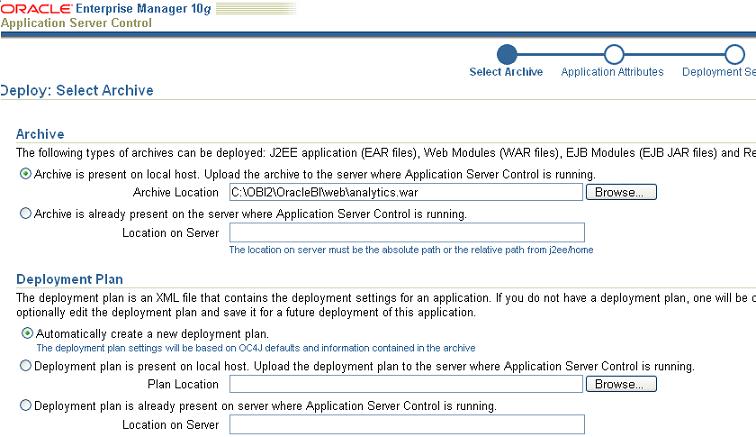
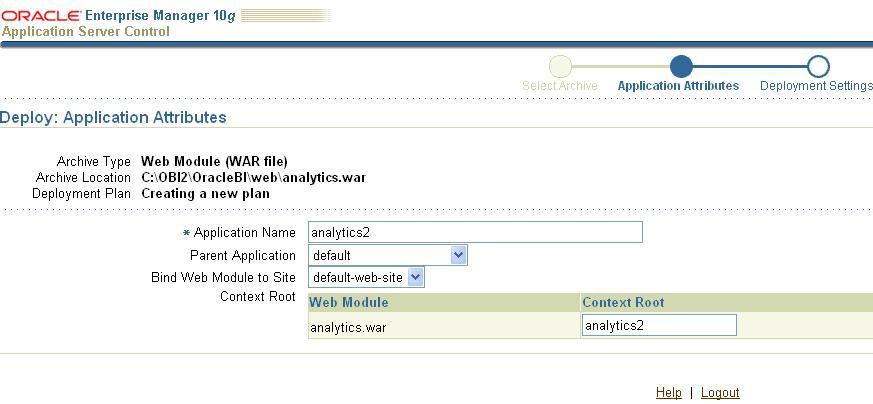
4. Now browse to the arhive location >\OracleBI\Web\analytics.war . Leave other default settings and click on next.


5 . You should see the below screen.


6 .Set the following values
Application Name: analytics2
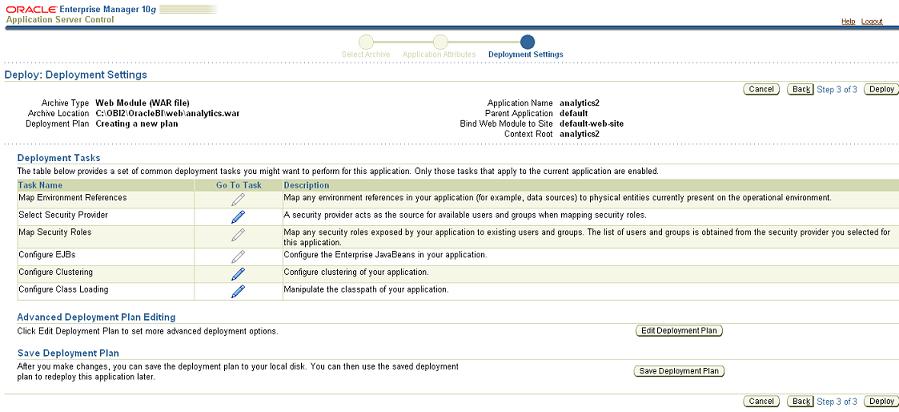
Context Root: analytics2 and then click on Next


7. Click on Deploy.


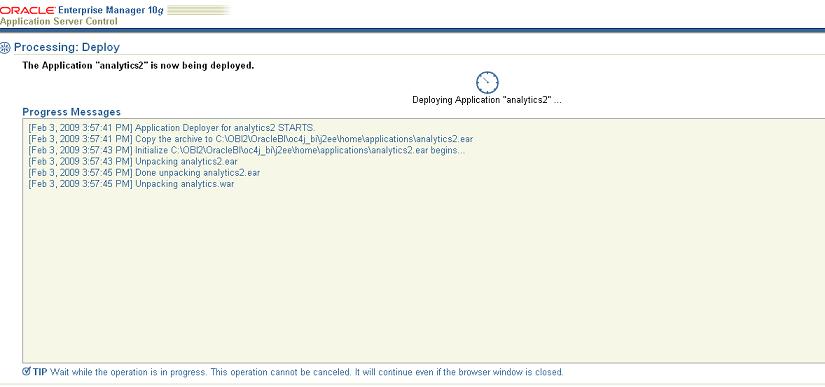
8. You should see the deployment starting as below.


9. Once the Deployment is completed the below screen will appear .


10.At this point the new presentation service analytics2 is available.
http://machinename:9704/analytics/
http://machinename:9704/analytics2/
Both the Presentation Services are currently pointing to the same Dashboard/Webcat and instanceconfig file.


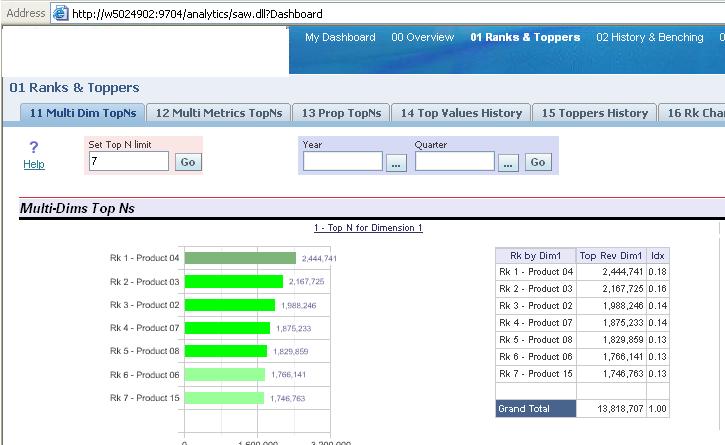
11. The below screen shows that I am now connecting to the new Presentation Services 'analytics2'

http://machinename:9704/analytics2/saw.dll?Dashboard


12.Now we will create a new catalog for the analytics2 presentation services.
>Copy the directory OracleBIData\web\catalog to OracleBIData\web\catalog_test. Now the new catalog-directory is ready to use and should be entered in the configuration file ( instanceconfig.xml).


13. Now we have created the new presentation service and the catalog for this service we have to change/create the configuration files. The default configuration file (instanceconfig.xml) tells us which listener-port, catalog and which presentation service will be used.
14. Make a copy of the original instanceconfig.xml and name this file instanceconfig_9710.xml. Also make a second copy of the original file and name this file instanceconfig_9712.xml
Edit the instanceconfig_9710.xml file as below
15.[ServerInstance]
[DSN]AnalyticsWeb1[DSN]
[CatalogPath]C:/OracleBIData/webcatalog/samplesales [CatalogPath]

Edit the instanceconfig_9712.xml file as below
[ServerInstance]
[DSN]AnalyticsWeb2[DSN]
[Listener port="9712"]
[CatalogPath]C: OracleBIDatawebcatalog_testpaint[CatalogPath]

16. Navigate to C:\OracleBI\oc4j_bi\j2ee\home\applications\analytics2\analytics\WEB-INF
And edit the file web.xml and modify the port number to 9712.
[param-name]oracle.bi.presentation.sawserver.Port[param-name]
[param-value]9712[param-value]

17. Create two batch files OBIEE1.bat and OBIEE2.bat
OBIEE1.bat = sawserver.exe -c C:\OBI2\OracleBIData\web\config\instanceconfig_9710.xml

18. OBIEE2.bat = sawserver.exe -c C:\OBI2\OracleBIData\web\config\instanceconfig_9712.xml
19. Modify the Config file to host two host two different RPD C:\OracleBI\server\Config and Edit the file NQSConfig.INI
[ REPOSITORY ]
Star = samplesales.rpd,DEFAULT;
Star2 = paint.rpd ;

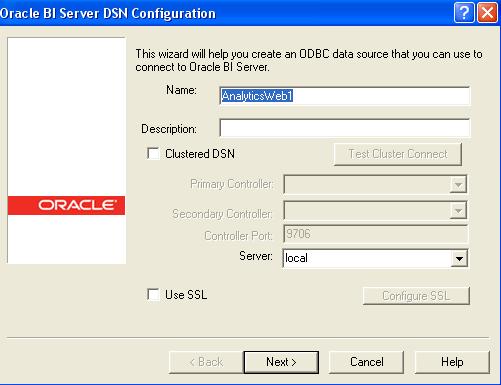
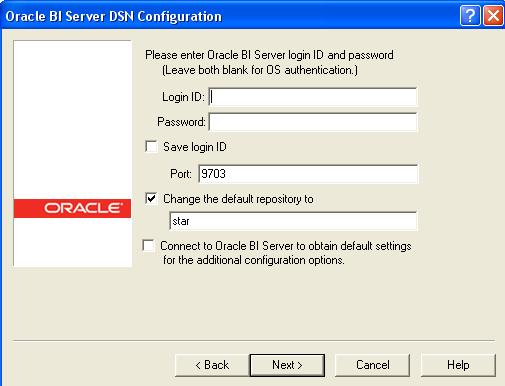
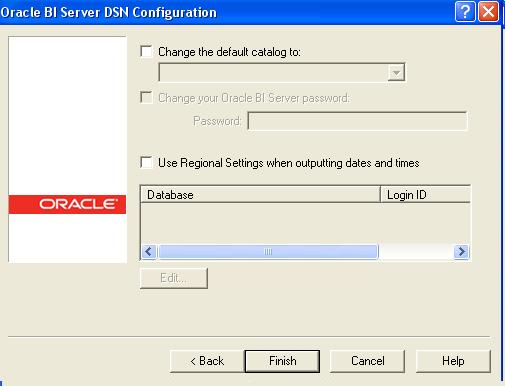
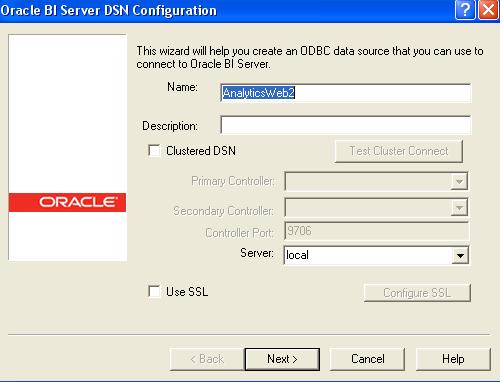
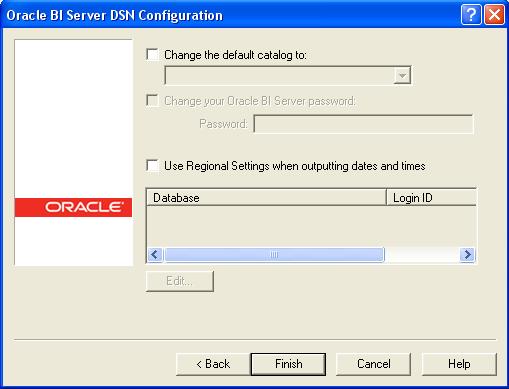
20. Create two ODBC connections
AnalyticsWeb1


21.


22.


23.


24. AnalyticsWeb2


25.


26.->Restart the OBIEE Server .
->Stop the OBIEE presentation Services.
->Click on both the batch files . The two OBIEE Presentation services will have their respective Webcatalog and their Respective RPD all hosted in the Same Windows Box .


27.


28.


29.